Check API Usage and Quota
Some API endpoints count against a quota in your organization's package. API Usage shows each quota, how much of it has been used and how much remains.
Before You Start
No package is needed to open this page, and any role can use it: API Usage is not limited to admins.
Where to Find It
Sidebar: SETTINGS › ORGANIZATION SETTINGS › API Usage · https://platform.deepinfo.com/app/settings/org-api-usage
Read the Screen
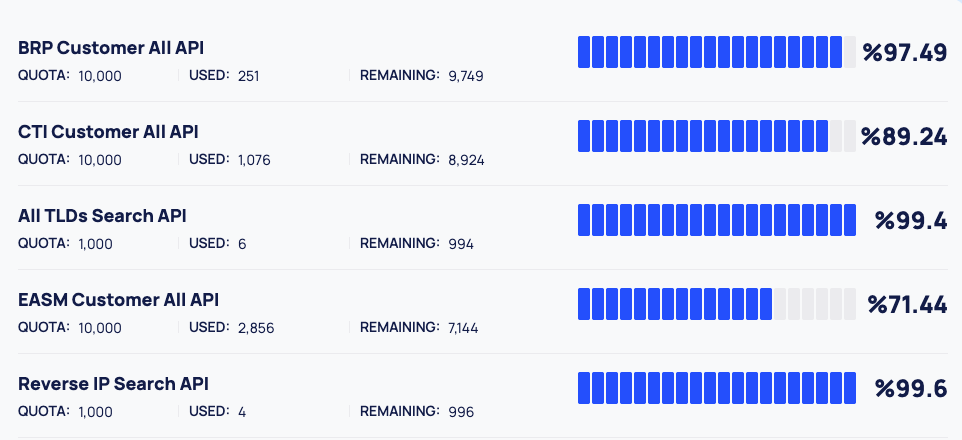
The page is a list with one row per quota, and no other controls. Each row shows:
| Part | What it shows |
|---|---|
| Name | The API or APIs that share this quota. When several share one quota, their names are separated by commas |
| QUOTA: | The size of the quota in your package |
| USED: | How much of it has been used |
| REMAINING: | How much is left |
| Bar | A segmented bar. The filled segments show the share that remains |
| Percentage | The share that remains, with the percent sign in front of the number |
Some rows cover a whole module, for example EASM Customer All API. Others cover a single API, for example Whois Lookup API or Domain Search.
A full bar means the quota is untouched. As the quota is used, the bar empties.
When there is nothing to show, the page reads "No API Usage Found."
Good to Know
- The bar and the percentage show what is left, not what is used.
- No period or reset date. The page does not show whether a quota is monthly, yearly or a total, or when it resets. Ask support@deepinfo.com if you need to know.
- The order of the rows can change when you reload the page. Look for a row by its name.
- Platform searches can count too. The platform calls the Deepinfo API with the default API key when you run searches and lookups, for example in Deep Search & Insights (DSI), so those can use quota.
- No filters or export. The page has no date range, filter or export.
Do This With the API
- Rate limits: how the quota works for API calls, and what happens when you go over the rate limit.