Prioritize Vulnerabilities
The Vulnerability List shows every active CVE that affects at least one of your assets. Use its scores and exploitation signals to decide which CVEs to fix first.
Before You Start
- Package: External Attack Surface Management (EASM).
- Role: Admin or Member.
Where to Find It
Sidebar: EXTERNAL ATTACK SURFACE MANAGEMENT › VULNERABILITIES · Tab: VULNERABILITIES LIST · https://platform.deepinfo.com/app/easm/vulnerabilities
The EASM dashboard's GO TO VULNERABILITIES PAGE and the Global dashboard's TOTAL VULNERABILITIES card open it too. Vulnerabilities has three in-page tabs:
| Tab | What it holds | Deep link |
|---|---|---|
| OVERVIEW | Summary cards (see The OVERVIEW tab) | /app/easm/vulnerabilities/overview |
| VULNERABILITIES LIST | The CVEs, described on this page | /app/easm/vulnerabilities |
| INSIGHTS | Volume over time, exploitability and the top CVEs; see Vulnerability insights | /app/easm/vulnerabilities/insights |
Read the Screen
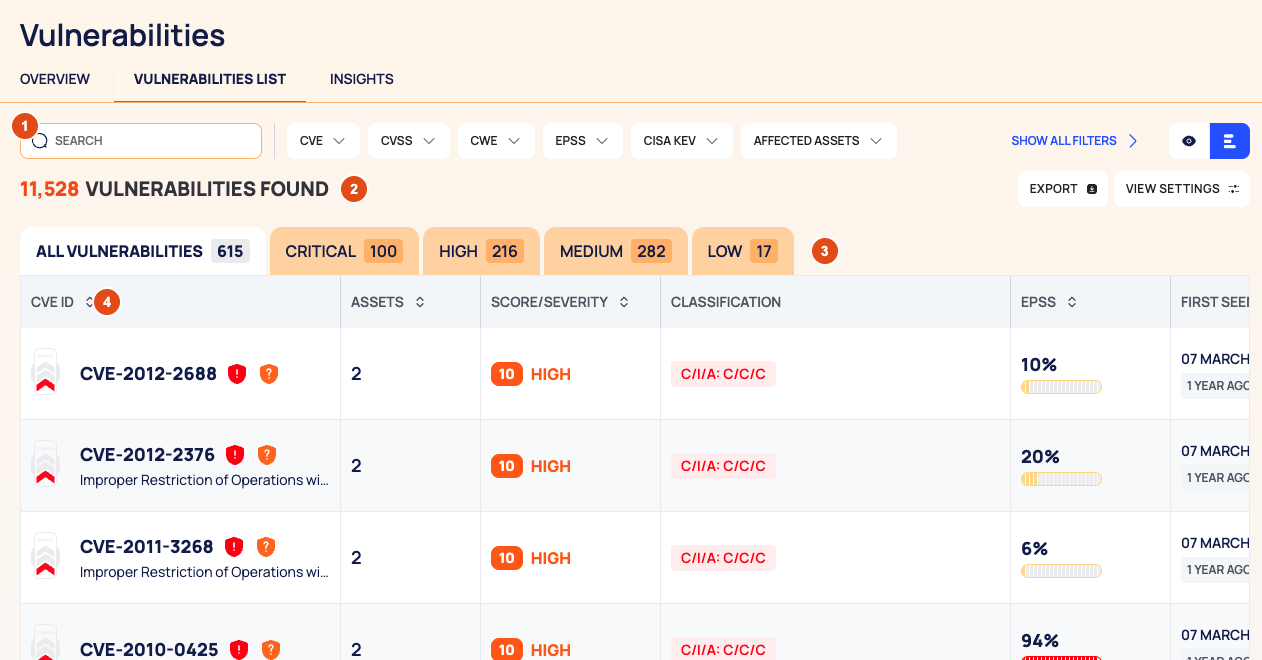
The header breadcrumb reads EASM / VULNERABILITIES / VULNERABILITIES LIST.
- Filter bar: SEARCH (by CVE ID), the category chips CVE, CVSS, CWE, EPSS, CISA KEV, AFFECTED ASSETS, DATES and STATE, and the list and quick view icons.
- Result row: the number of vulnerabilities found, EXPORT and VIEW SETTINGS.
- Severity tabs with counts: ALL VULNERABILITIES, CRITICAL, HIGH, MEDIUM and LOW.
- The list, one row per CVE.
| Column | What it shows |
|---|---|
| CVE ID | The CVE ID, a red EXPLOITABLE pill above it for CVEs in the CISA KEV catalog, a Certain or Potential icon, and the CWE name and number. A danger indicator of up to three bars sits next to it |
| ASSETS | How many of your assets it affects |
| SCORE/SEVERITY | The CVSS base score and the severity |
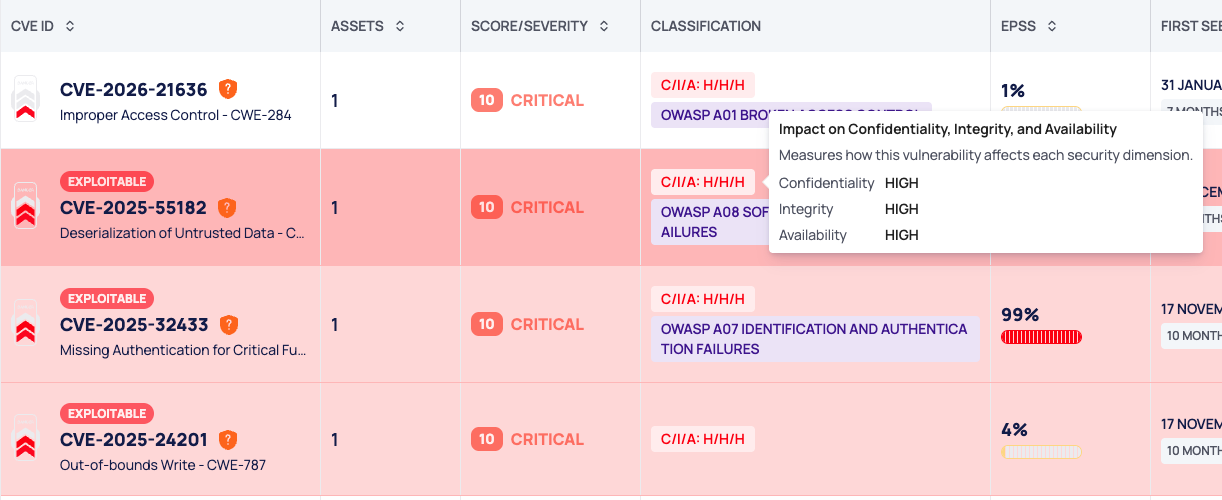
| CLASSIFICATION | A C/I/A chip with the impact on confidentiality, integrity and availability, one letter each (for example C/I/A: H/L/N; hover for details), and an OWASP chip |
| EPSS | The CVE's EPSS value, as a percentage bar |
| FIRST SEEN DATE | When it was first found on your assets, with the time since |
| LAST SEEN DATE | When it was last found, with the time since |
The danger indicator adds one bar each when the CVE is critical, when it is certain, and when it is in the CISA KEV catalog.
Prioritize the List
- Start on the CRITICAL tab.
- Look for the red EXPLOITABLE pill: the CVE is in the CISA KEV catalog.
- Sort the list. Select a column header (every column except CLASSIFICATION sorts), or open VIEW SETTINGS › Sort By and pick CVE ID, Assets, Score/Severity, EPSS, First Seen Date or Last Seen Date and a direction. Assets, Score/Severity and EPSS are the most useful for ranking.
- Open a CVE to see which assets it affects and, for a CVE in the CISA KEV catalog, the required action (see below).
- On each affected asset, record your decision by changing the state. See Change the state of issues and vulnerabilities.
Filter the List
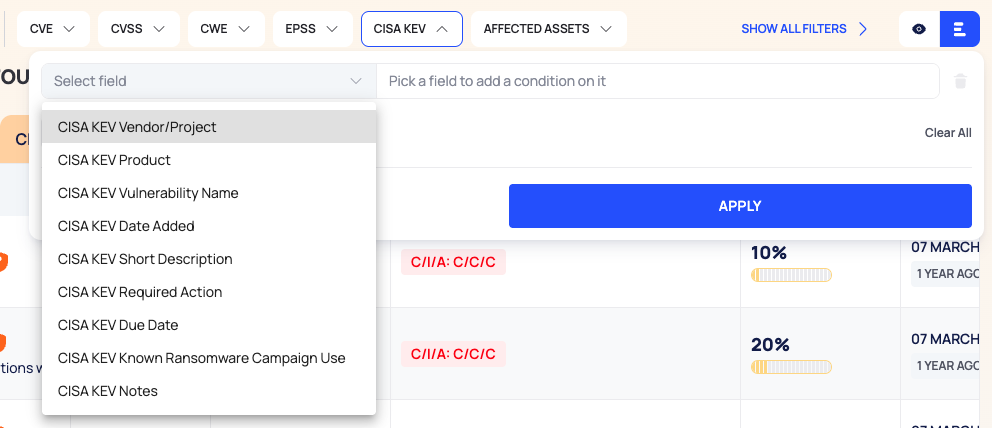
SEARCH matches the CVE ID. Each category chip opens Select field, where you pick one of its fields:
| Chip | Fields, for example |
|---|---|
| CVE | CVE ID, CVE Published, CVE Last Modified |
| CVSS | CVSS Version, CVSS Base Score, CVSS Base Severity, the impact on confidentiality, integrity and availability |
| CWE | CWE ID, CWE OWASP Top 10 (2021), CWE Name |
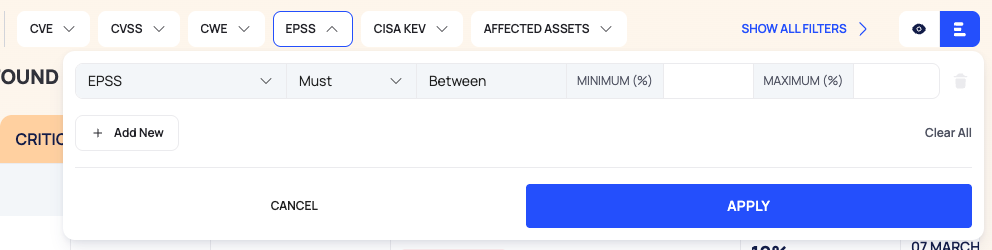
| EPSS | EPSS, EPSS Percentile, EPSS Date |
| CISA KEV | CISA KEV Vendor/Project, Product, Vulnerability Name, Date Added, Required Action, Due Date, Known Ransomware Campaign Use |
| AFFECTED ASSETS | The number of affected assets, in total and per asset type |
| DATES | First Seen Date, Last Seen Date, Last Check Date |
| STATE | The CVE's state |
Then set the rule (Must, Must Not or Should), the operator and the Value. Text fields offer Equal, Wildcard, Fuzzy, Contains Any, Start With and Exists. Number fields, such as EPSS, use Between with a minimum and a maximum. Select APPLY. A chip with active conditions shows their number.
The rules work as in the API; see Search & filters.
Open a CVE
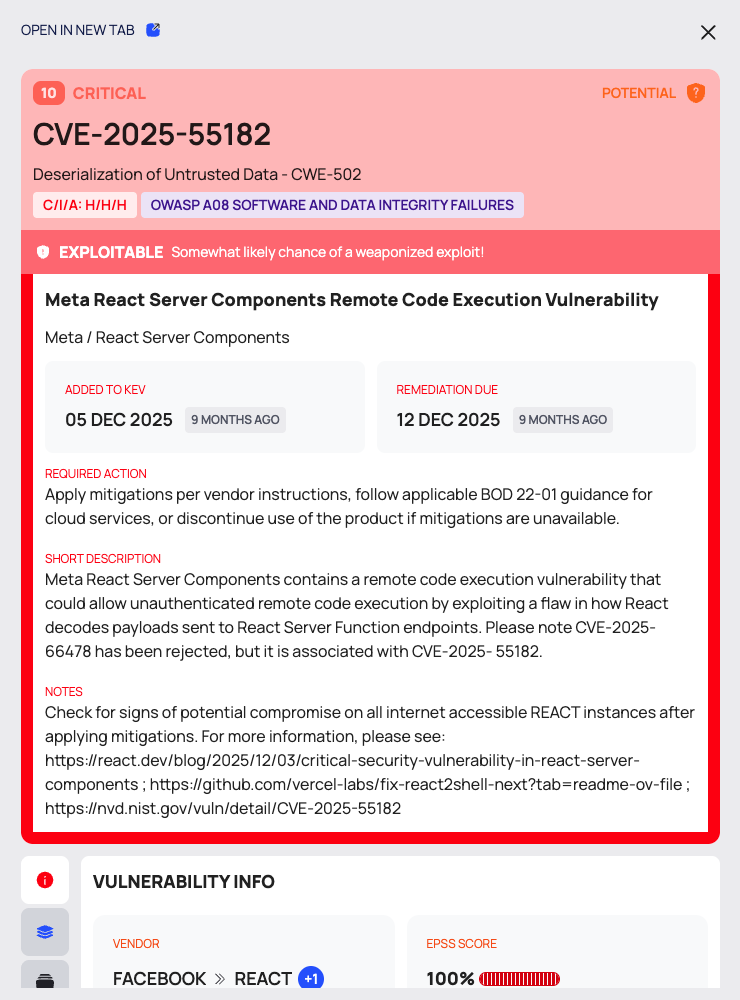
Select a row to open the CVE drawer. OPEN IN NEW TAB opens the CVE page.
The top of the drawer shows the score and severity, the CERTAIN or POTENTIAL flag, the CVE ID, the CWE, the C/I/A chip and, for a new finding, a NEW badge. For a CVE in the CISA KEV catalog, an EXPLOITABLE strip and a CISA KEV block follow, with ADDED TO KEV, REMEDIATION DUE, REQUIRED ACTION, SHORT DESCRIPTION and NOTES.
The drawer's tabs are icons down the side; hover over an icon to see its name.
| Tab | What it shows |
|---|---|
| OVERVIEW | Under VULNERABILITY INFO: VENDOR, EPSS SCORE, PUBLISHED DATE, LAST MODIFIED DATE and the CVE description |
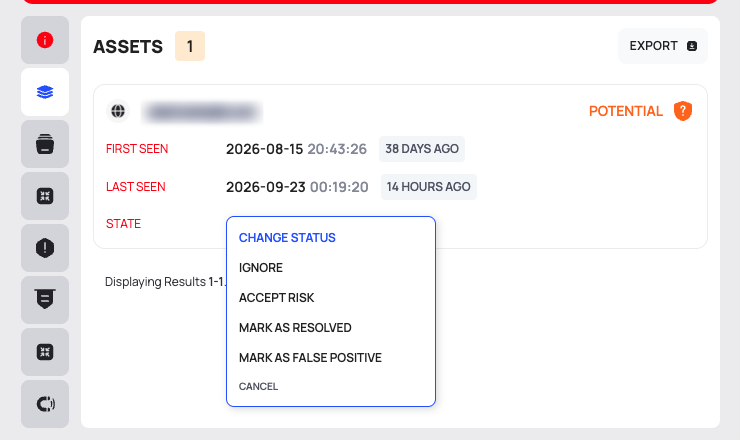
| ASSETS | Your assets where the CVE is active, with FIRST SEEN, LAST SEEN and a STATE chip you can change. EXPORT downloads the list |
| CISA KEV CATALOG | The CISA KEV entry: VENDOR / PROJECT, PRODUCT, DATE ADDED, KNOWN RANSOMWARE USE, SHORT DESCRIPTION, REQUIRED ACTION and notes, with a RANSOMWARE badge when ransomware use is known |
| IMPACT PROFILE | Confidentiality, integrity and availability impact |
| WEAKNESS IDENTITY | The CWE with its description, impact badges and CAPEC references |
| CVSS METRICS | The CVSS vector and its values, Exploitability, Impact, Base score and Severity |
| AFFECTED PRODUCT | The affected products, with PRODUCT TYPE, VENDOR, VERSION, ALL AFFECTED VERSIONS and ALL CPE NAMES |
| REFERENCES | Reference links, each with its source and tags such as EXPLOIT |
VENDOR shows the first affected product listed for the CVE, with the number of others. For the full list, open AFFECTED PRODUCT.
The CVE Page
The CVE page (breadcrumb EASM / VULNERABILITIES / CVE ID) has the same header and three tabs. See Vulnerability details for the full page.
- OVERVIEW: INFO (VENDOR / PRODUCT, EPSS SCORE, PUBLISHED DATE, LAST MODIFIED DATE), CVSS SCORE on a 0–10 gauge, and AFFECTED ASSETS with a count per asset type.
- ASSETS: ASSET NAME, STATE, FIRST SEEN and LAST SEEN, with chips to show one asset type. Change an asset's state from its STATE chip.
- VULNERABILITY INFO: IMPACT PROFILE, WEAKNESS IDENTITY, ATTACK PROFILE, DETECTION & FORENSICS, AFFECTED PRODUCT and META INFO.
Export the List
- Select EXPORT. The DOWNLOAD dialog opens.
- Choose the RECORDS: ALL exports all active CVEs. FILTERED is offered when filters are applied and exports what you see: the current tab, your filters and your sort.
- Choose the FILE FORMAT, CSV or JSON, and select DOWNLOAD.
For the other options in the dialog, see Browse your asset inventory.
Quick View
Select the quick view icon for a CVE list on the left and the selected CVE's full page on the right, with OPEN IN NEW TAB. The left list shows each CVE's score, its ID and an EXP. pill for CISA KEV CVEs. Use LOAD MORE to page through.
The OVERVIEW Tab
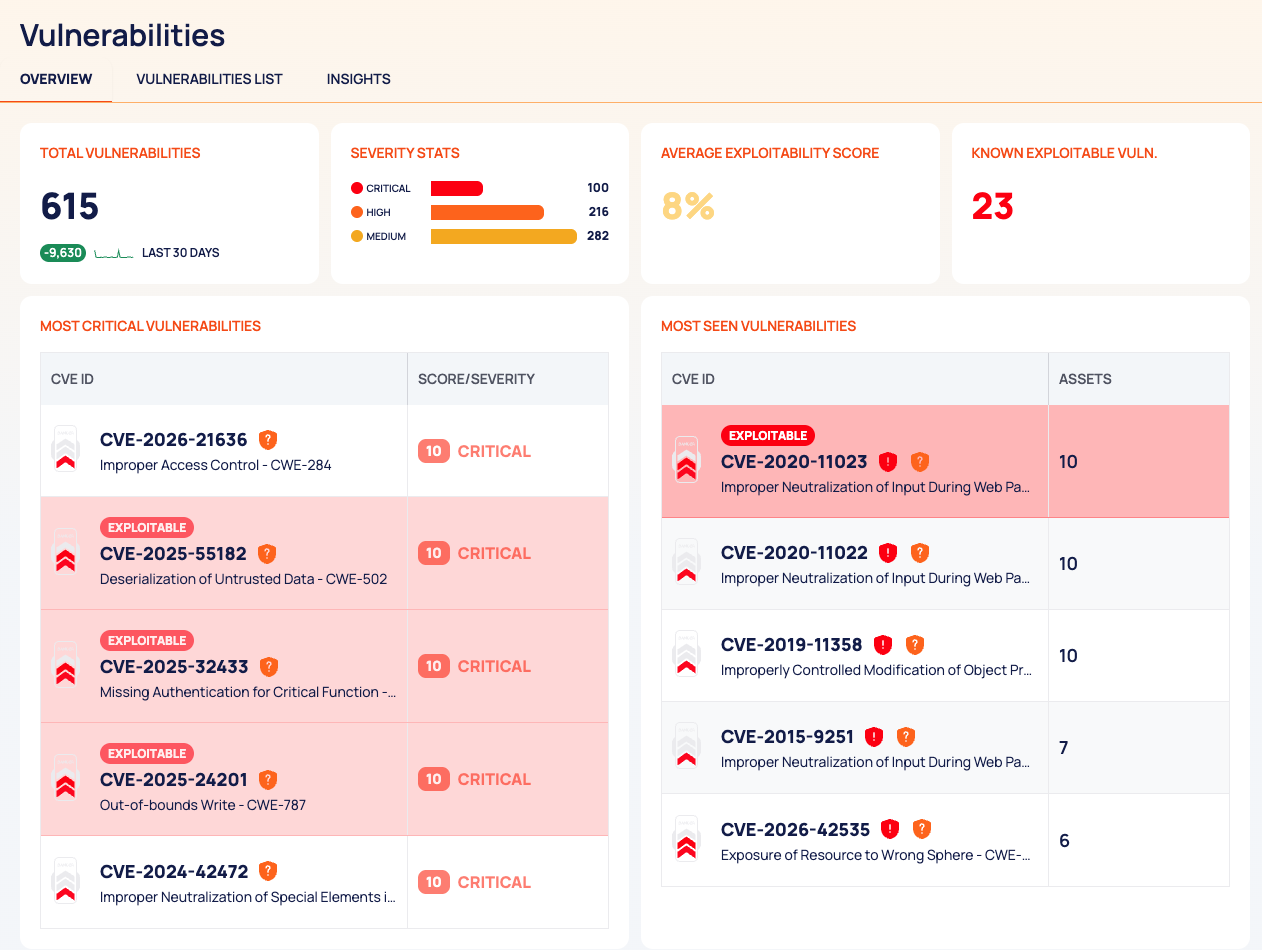
| Card | What it shows |
|---|---|
| TOTAL VULNERABILITIES | With a change chip and LAST 30 DAYS |
| SEVERITY STATS | The count for the severities CRITICAL, HIGH and MEDIUM |
| AVERAGE EXPLOITABILITY SCORE | As a percentage |
| KNOWN EXPLOITABLE VULN. | In red: the number of assets affected by known-exploitable vulnerabilities |
| MOST CRITICAL VULNERABILITIES | CVE ID and SCORE/SEVERITY |
| MOST SEEN VULNERABILITIES | CVE ID and ASSETS |
The severity tabs of the VULNERABILITIES LIST show the count of every severity.
States, Colors and Scores
| Signal | Scale | Meaning |
|---|---|---|
| SCORE/SEVERITY | 0–10 | The CVSS base score (version 3, or version 2 when there is no version 3 score) |
| EPSS | percentage | The CVE's EPSS value |
| EXPLOITABLE / EXP. | yes or no | The CVE is in the CISA KEV catalog |
| Certain | flag | "This vulnerability has been verified through testing and confirmed as valid." |
| Potential | flag | "This vulnerability has been identified through testing but not yet confirmed." |
| NEW | badge | First detected on your assets in the last 7 days |
These scales are not the security score. See How security scores work.
Good to Know
- The list shows active CVEs only.
- You cannot change a state from the list rows. Open the CVE and change it per asset on the ASSETS tab.
- KNOWN EXPLOITABLE VULN. counts affected assets, not CVEs.
- VIEW SETTINGS also sets the page size (25, 50, 75 or 100) and, under SHOWN, the visible columns.
Do This With the API
- Search vulnerabilities: Vulnerability Search
- The assets a CVE affects: Vulnerability Asset Search
- Export as CSV or JSON: Vulnerability Export
- Counts per severity: Vulnerability Severity Stats
- Known-exploitable counts: Vulnerability Known Exploitable Stats
- Average exploitability: Vulnerability Exploitability Score Stats