Vulnerability Insights
The INSIGHTS tab of Vulnerabilities shows your vulnerabilities over time, how exposed your assets are to CVEs that are known to be exploited, the average exploitability, and the CVEs with the highest scores.
Before You Start
- Package: External Attack Surface Management (EASM).
- Role: Admin or Member.
Where to Find It
Sidebar: EXTERNAL ATTACK SURFACE MANAGEMENT › VULNERABILITIES · Tab: INSIGHTS · https://platform.deepinfo.com/app/easm/vulnerabilities/insights
Read the Screen
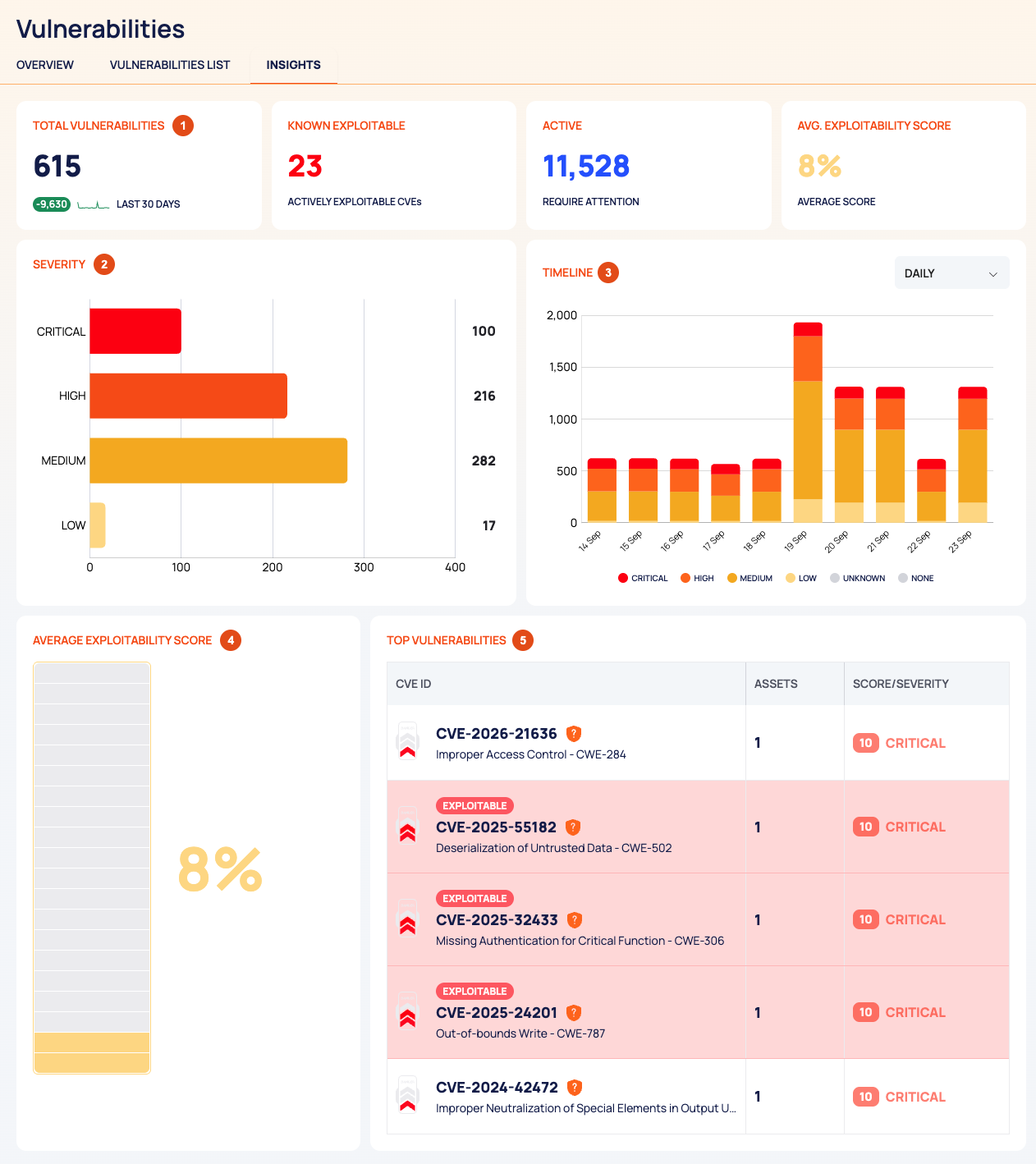
Cards:
Card What it shows TOTAL VULNERABILITIES The sum of your vulnerabilities per severity, with the change over the LAST 30 DAYS KNOWN EXPLOITABLE Labeled ACTIVELY EXPLOITABLE CVEs, but it counts your assets affected by CVEs in the CISA KEV catalog, not the CVEs ACTIVE The number of active vulnerabilities, labeled REQUIRE ATTENTION AVG. EXPLOITABILITY SCORE The average exploitability score of your vulnerabilities, as a percentage, labeled AVERAGE SCORE SEVERITY: your vulnerabilities per severity.
TIMELINE: vulnerabilities per severity over time, with a legend for CRITICAL, HIGH, MEDIUM, LOW, UNKNOWN and NONE. Choose the interval in the dropdown.
AVERAGE EXPLOITABILITY SCORE: the same average as the card, as a meter.
TOP VULNERABILITIES: the CVEs with the highest CVSS scores, with CVE ID, ASSETS and SCORE/SEVERITY. Select a row to open the CVE's page; see Vulnerability details.
Use the Page
- Watch the trend: on TIMELINE, check whether critical and high vulnerabilities go down as you fix them.
- Gauge your exposure to known exploits: KNOWN EXPLOITABLE shows how many assets are affected by CVEs in the CISA KEV catalog. To list those CVEs, open VULNERABILITIES LIST and look for the red EXPLOITABLE pill.
- Start with the worst: open the CVEs in TOP VULNERABILITIES and check their affected assets.
Good to Know
- TOTAL VULNERABILITIES and ACTIVE can show different numbers. TOTAL VULNERABILITIES matches the counts on the severity tabs of VULNERABILITIES LIST. ACTIVE matches the result count above that list (the number before VULNERABILITIES FOUND).
- KNOWN EXPLOITABLE counts assets, not CVEs.
- TOP VULNERABILITIES ranks CVEs by score and does not check their state, so it can include a CVE that is no longer active on your assets. Check the CVE's ASSETS tab.
- The timeline can show UNKNOWN and NONE severities. VULNERABILITIES LIST has no tab for them.
- The page is for reading only. It has no filters and no export.
- The Vulnerabilities OVERVIEW tab has the summary cards; see Prioritize vulnerabilities.
Do This With the API
- Vulnerabilities per severity: Vulnerability Severity Stats
- Per severity over time: Vulnerability Severity Stats Timeline
- Known-exploitable counts (CVEs and assets): Vulnerability Known Exploitable Stats
- Average exploitability: Vulnerability Exploitability Score Stats
- Active vulnerabilities: Vulnerability Search