Vulnerability Details
A vulnerability is a CVE that affects at least one of your assets. Its page shows how severe the CVE is, whether it is known to be exploited, which of your assets it affects and in what state, and the full CVE record.
Before You Start
- Package: External Attack Surface Management (EASM).
- Role: Admin or Member.
Where to Find It
Sidebar: EXTERNAL ATTACK SURFACE MANAGEMENT › VULNERABILITIES · Tab: VULNERABILITIES LIST · https://platform.deepinfo.com/app/easm/vulnerabilities
Select a CVE to open its drawer, then select OPEN IN NEW TAB. You can also reach the page from:
- quick view on VULNERABILITIES LIST: OPEN IN NEW TAB above the selected CVE;
- the MOST CRITICAL VULNERABILITIES and MOST SEEN VULNERABILITIES rows on the EASM dashboard and on the Vulnerabilities OVERVIEW tab, and TOP VULNERABILITIES on its INSIGHTS tab;
- an asset's VULNERABILITIES tab (see Investigate an asset).
The page address is https://platform.deepinfo.com/app/easm/vulnerabilities/<CVE ID>.
Read the Screen
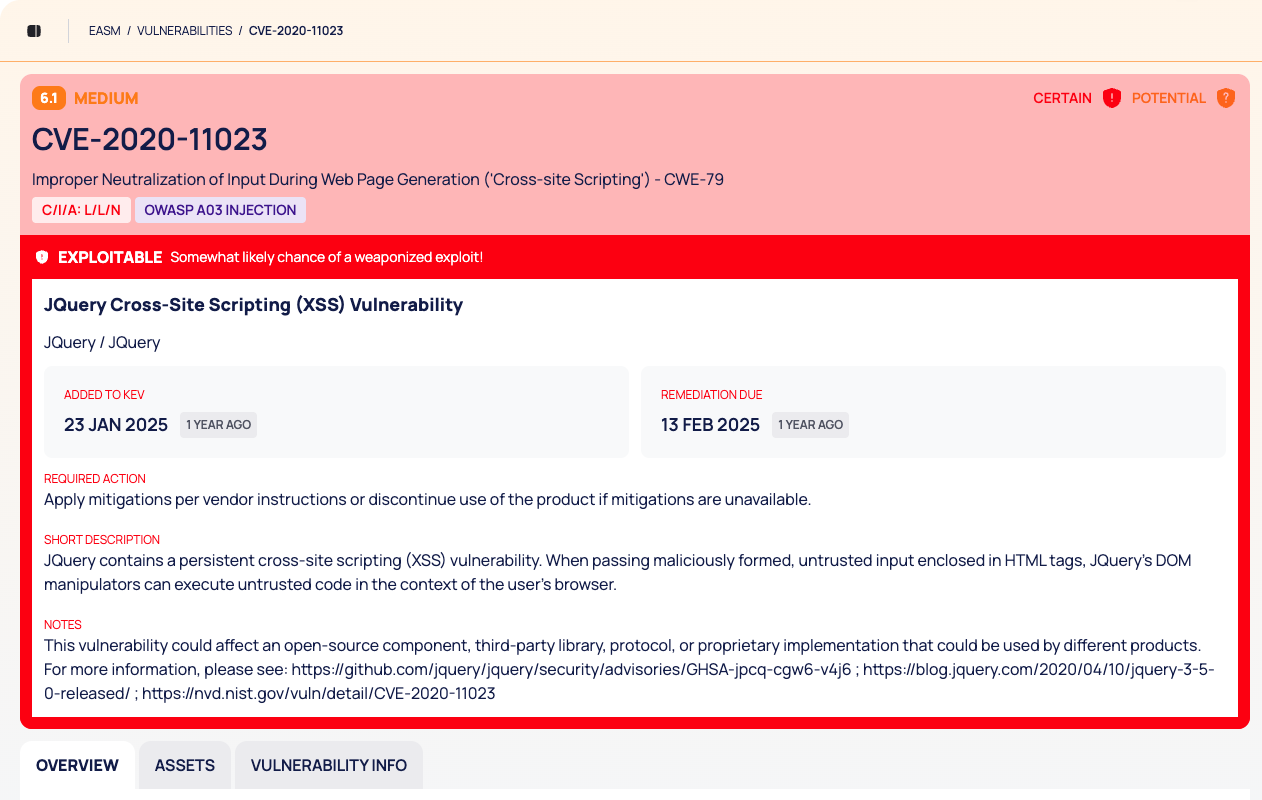
Header. The breadcrumb EASM / VULNERABILITIES / followed by the CVE ID, then:
- the score and severity, and a CERTAIN or POTENTIAL flag;
- the CVE ID, the CWE name and number, and the C/I/A chip (the impact on confidentiality, integrity and availability);
- for a CVE in the CISA KEV catalog, a red EXPLOITABLE strip that says a weaponized exploit is somewhat likely, and a block with the vulnerability's name, the vendor and product, ADDED TO KEV, REMEDIATION DUE, REQUIRED ACTION, SHORT DESCRIPTION and NOTES.
Tabs: OVERVIEW, ASSETS and VULNERABILITY INFO.
OVERVIEW
| Card | What it shows |
|---|---|
| INFO | VENDOR / PRODUCT: the first affected vendor and product, with a count of the others. EPSS SCORE, PUBLISHED DATE and LAST MODIFIED DATE |
| CVSS SCORE | The CVSS base score on a 0–10 gauge, with the severity |
| AFFECTED ASSETS | How many of your assets the CVE affects, with the count per asset type |
ASSETS
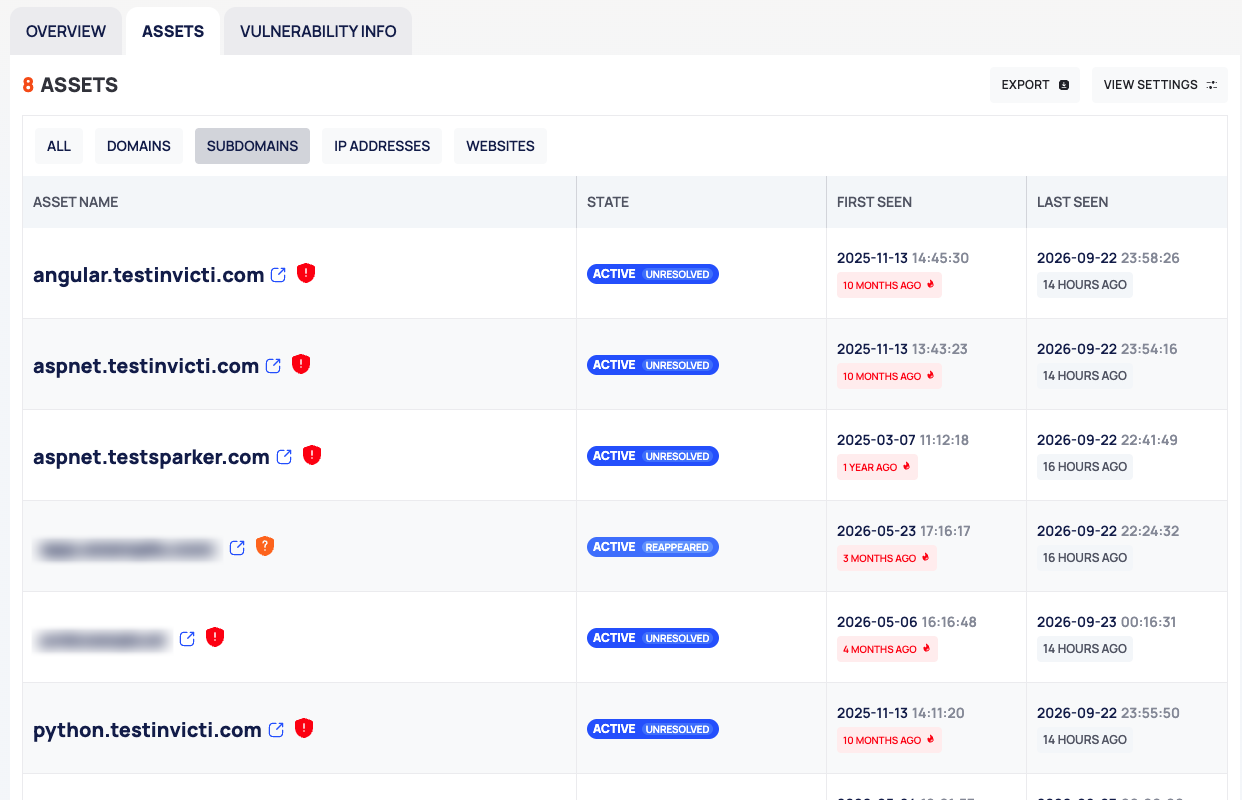
- Header: the number of assets, EXPORT (not available on this tab; see Good to Know) and VIEW SETTINGS.
- Chips: ALL, DOMAINS, SUBDOMAINS, IP ADDRESSES and WEBSITES.
- Columns: ASSET NAME, STATE, FIRST SEEN and LAST SEEN. The columns do not sort.
The tab lists the assets where the CVE is active. Select a row to open the asset drawer.
VULNERABILITY INFO
| Section | What it shows |
|---|---|
| IMPACT PROFILE | The impact on confidentiality, integrity and availability |
| WEAKNESS IDENTITY | The CWE, with its description, impact and related CAPEC entries |
| ATTACK PROFILE | ATTACK VECTOR, ATTACK COMPLEXITY, PRIVILEGES REQUIRED, DESTINATION and SCOPE |
| DETECTION & FORENSICS | DETECTION METHOD, ATTACK STAGES, ANALYSIS DATE and CVE ORIGIN |
| AFFECTED PRODUCT | The affected products |
| META INFO | CVE ID, ASSIGNER, PROBLEM TYPE, REFERENCES and DATA VERSION |
Decide What to Do About a CVE
- In the header, check whether the CVE is EXPLOITABLE. If it is, read REQUIRED ACTION and note the REMEDIATION DUE date.
- On OVERVIEW, check the CVSS SCORE and the EPSS SCORE.
- On ASSETS, see which assets are affected. Narrow the list with a chip and open each asset to check it.
- Fix the CVE on the asset, or record your decision: select the asset's STATE chip and choose a state. The state applies to this CVE on this asset only. See Change the state of issues and vulnerabilities.
To change the state of several vulnerabilities at once, use the VULNERABILITIES tab of an asset; see Investigate an asset.
States, Colors and Scores
| Signal | Scale | Meaning |
|---|---|---|
| Score and severity | 0–10 | The CVSS base score |
| EPSS SCORE | percentage | The CVE's EPSS value |
| EXPLOITABLE | yes or no | The CVE is in the CISA KEV catalog |
| CERTAIN | flag | "This vulnerability has been verified through testing and confirmed as valid." |
| POTENTIAL | flag | "This vulnerability has been identified through testing but not yet confirmed." |
| NEW | badge | First detected on your assets in the last 7 days |
These scales are not the security score. See Prioritize vulnerabilities and How security scores work.
Good to Know
- Check the CVE ID in the address. The address of a CVE ID that does not exist, for example a mistyped one, can still open a page with no data, without an error: a score of 0, no assets and today's date as the published date.
- To export the affected assets, use the EXPORT button on the ASSETS tab of the CVE drawer, which opens from VULNERABILITIES LIST.
- VENDOR / PRODUCT shows only the first product in the CVE's list. For the full list, open VULNERABILITY INFO › AFFECTED PRODUCT.
Do This With the API
- The CVE record: Vulnerability Detail
- The CVE on your assets: Vulnerability Search
- The affected assets and their states: Vulnerability Asset Search
- Export the affected assets: Vulnerability Asset Export