Set Up Your Account From an Email Link
The platform has no sign-up form. You set up your account from a link in an email: an invitation from an admin in your organization, or an email asking you to activate your Deepinfo account. Either way, you choose your own password on the page the link opens, then sign in.
Before You Start
You need the invitation email or the activation email. No package or role is needed.
Where to Find It
Both pages open only from the link in the email. They have no menu entry.
Accept an Invitation
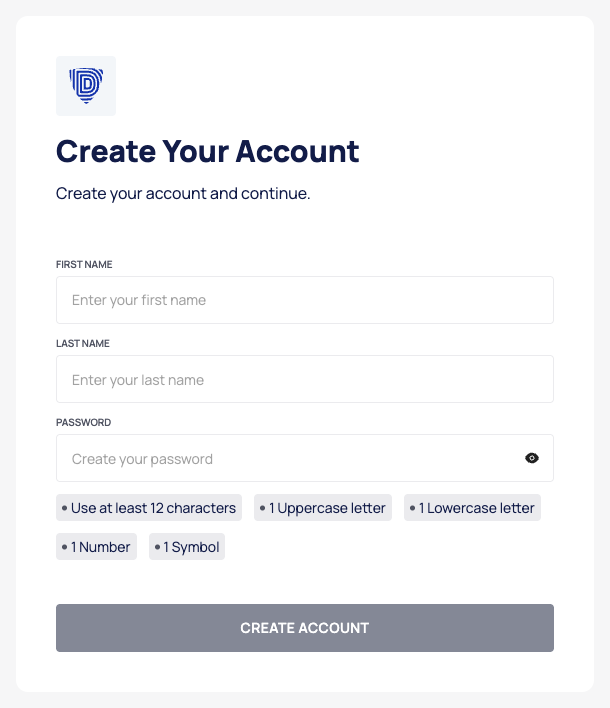
- Open the link in the invitation email. The Create Your Account page opens.
- Enter your name in FIRST NAME (required) and LAST NAME.
- Enter a password in PASSWORD. The rules below the field turn green as you meet them. See Password rules.
- Select CREATE ACCOUNT. The button is enabled once you have entered a first name and the password meets every rule.
- When Account Created appears, select GO TO SIGN IN, and sign in with the address the invitation was sent to and your new password.
The page does not show or ask for your email address: the link in the invitation identifies it.
Activate an Account
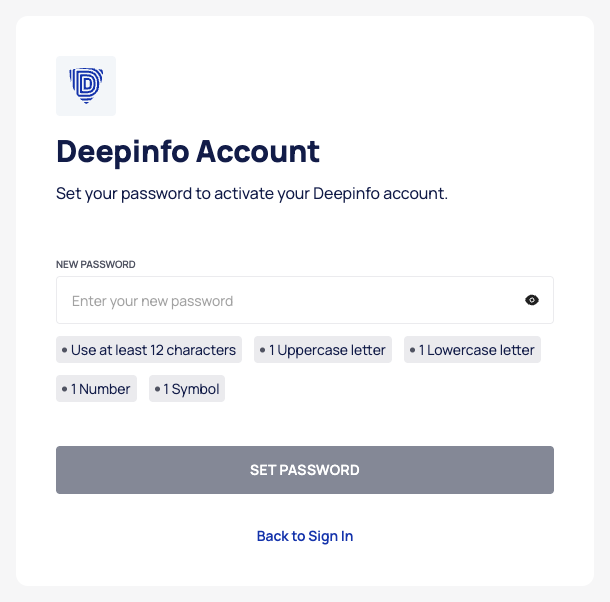
- Open the link in the activation email. The Deepinfo Account page opens.
- Enter a password in NEW PASSWORD that meets every password rule.
- Select SET PASSWORD.
- When Account created appears, select BACK TO SIGN IN and sign in.
Good to Know
- Your role. An invitation does not set a role. Once you have joined, an admin in your organization can make you an Admin or a Member. See What you can access.
- The invitation link no longer works? Ask an admin in your organization to resend the invitation. See Manage members and invitations.
- Next steps. Turn on two-factor authentication, then check your name and time zone in your profile.