Review Suspicious Domains
Every domain your detection rules find lands on the SUSPICIOUS DOMAINS list. Check each one, then mark it as fraudulent if it imitates your brand, or ignore it if it does not.
Before You Start
- Package: Brand Risk Protection (BRP).
- Role: Admin or Member.
- Data: detection rules; see Set up detection rules.
Where to Find It
Sidebar: BRAND RISK PROTECTION › FRAUDULENT DOMAINS · Tab: FRAUDULENT DOMAINS › list tab SUSPICIOUS DOMAINS · https://platform.deepinfo.com/app/brp/fraudulent?tab=suspicious
This is the list the sidebar item opens. The SUSPICIOUS DOMAINS card on the OVERVIEW tab opens it too.
Read the Screen
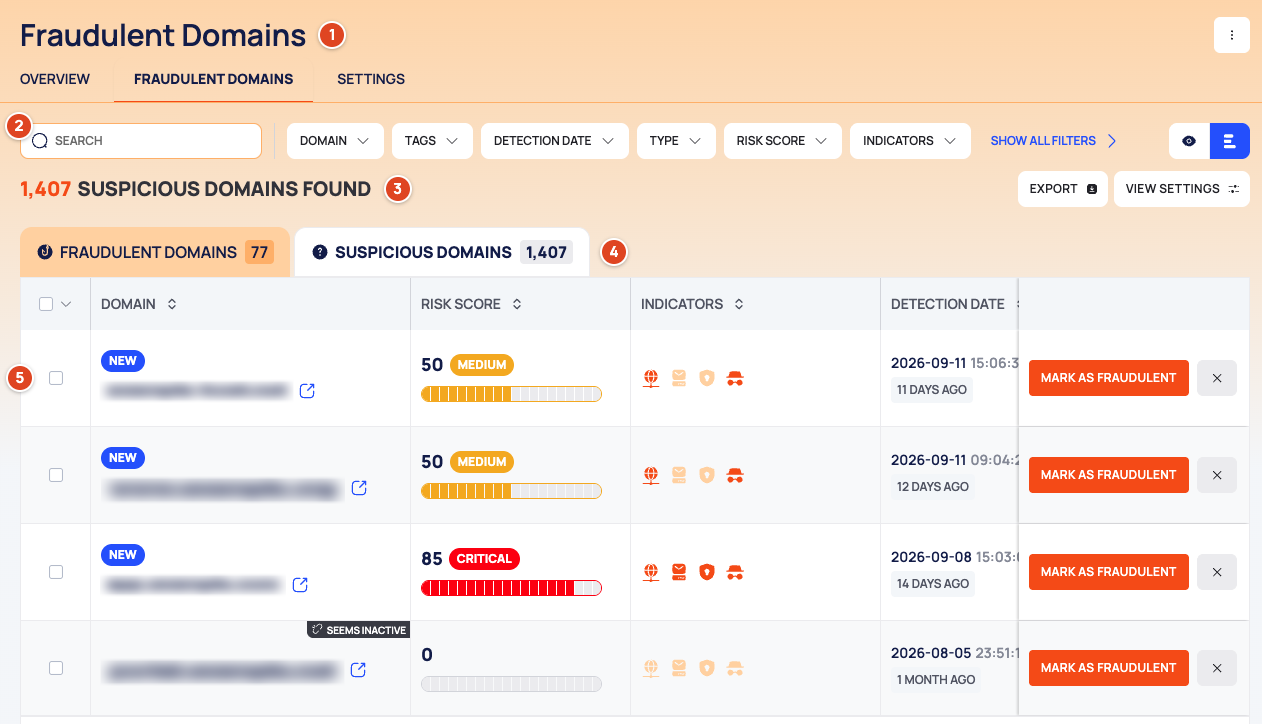
- Header: the title Fraudulent Domains, the ⋮ menu (IGNORED DOMAINS) and the in-page tabs OVERVIEW, FRAUDULENT DOMAINS and SETTINGS.
- Filter bar: SEARCH, the filter chips starting with DOMAIN, TAGS, DETECTION DATE and TYPE, SHOW ALL FILTERS for the rest, and the list view and quick view icons. A filter that holds a rule shows its count.
- Count line: how many suspicious domains match, then EXPORT and VIEW SETTINGS (list view only).
- List tabs, each with its count: FRAUDULENT DOMAINS and SUSPICIOUS DOMAINS.
- The list, 25 rows per page, newest DETECTION DATE first. Select a column header to sort by it.
- A checkbox on every row.
- DOMAIN: the site icon and the name, with the NEW badge (first detected in the last 14 days), the SEEMS INACTIVE banner and an external-link icon.
- RISK SCORE: the score, its label and a bar.
- INDICATORS: DNS, DNS MX, SSL and HTTP.
- DETECTION DATE: the date, the time and how many days ago.
- RULES: the rules that detected the domain.
- MARK AS FRAUDULENT and a ✕ button (ignore) at the end of the row.
Brand Risk Protection (BRP) explains the risk score, the indicators and the badges.
Caution
The external-link icon opens the suspicious domain itself in your browser. It may host a phishing page or malware. Use the drawer tabs below to check a domain without visiting it.
Check a Domain Before You Decide
- Select a row. The domain's drawer opens on the right.
- The drawer's tabs are icons; the name of the open tab is shown as its heading. Read:
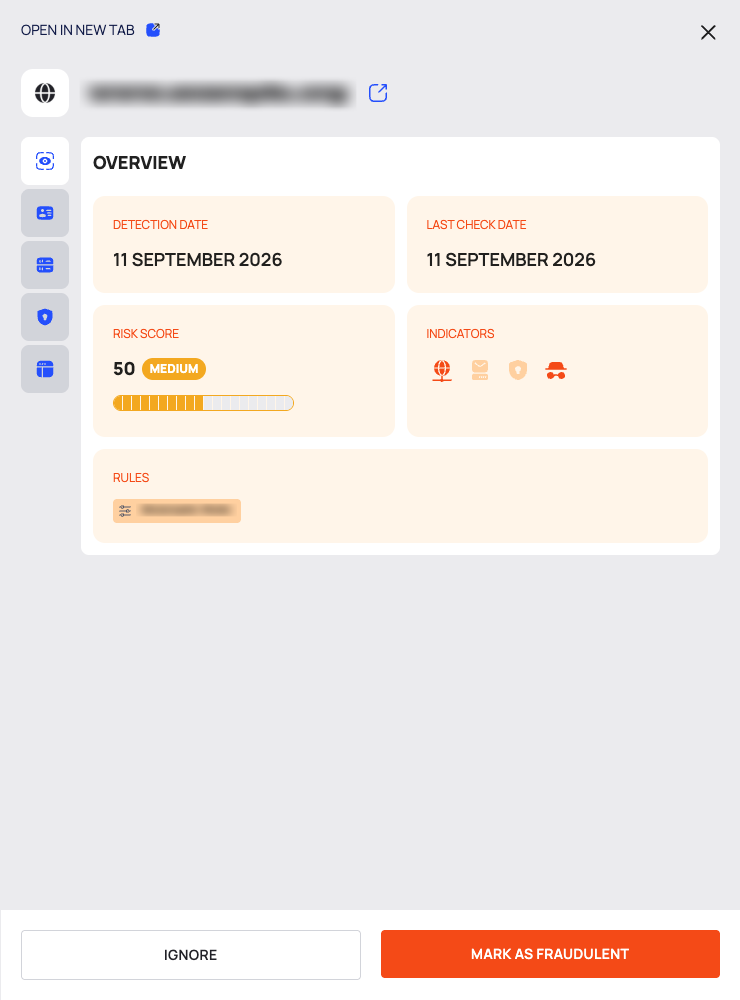
- OVERVIEW: DETECTION DATE, LAST CHECK DATE, RISK SCORE, INDICATORS and RULES.
- WHOIS: CREATE DATE, EXPIRATION DATE, UPDATED DATE, NAME SERVER, DOMAIN STATUS, REGISTRAR and the Registrant block.
- DNS: one table per record type (A, AAAA, MX, NS, SOA and more).
- SSL: Details, Fingerprint and Signature.
- WEBSITE INFO: Metadata, Robots.txt, HTML, Favicon, HTTP Status (with REDIRECTION HISTORY) and HTTP Headers.
- Decide with the buttons at the bottom of the drawer: IGNORE or MARK AS FRAUDULENT.
The WHOIS, DNS, SSL and WEBSITE INFO tabs show the data stored for the domain at its last check. Opening them does not run a new lookup. LAST CHECK DATE on OVERVIEW tells you when that data was collected; compare it with today's date to judge how current it is.
To give the domain a page of its own, select OPEN IN NEW TAB at the top of the drawer. The page opens in a
new browser tab (/app/brp/fraudulent/detected/<id>) and has MARK AS FRAUDULENT and IGNORE at the top,
the tabs OVERVIEW, WHOIS, DNS, SSL and WEBSITE INFO, an INFO card (RISK SCORE,
DETECTION DATE, LAST CHECK DATE, INDICATORS) and a RULES card. The page has no back button; the
FRAUDULENT DOMAINS link in the header breadcrumb returns to the list.
Work Through the List in Quick View
Select the quick view icon in the filter bar. The domains are listed on the left (LOAD MORE adds more); the selected domain opens on the right with OPEN IN NEW TAB, MARK AS FRAUDULENT, IGNORE, the same tabs and the INFO and RULES cards.
Mark a Domain as Fraudulent
- Select MARK AS FRAUDULENT on the row, in the drawer, in quick view or on the domain's page.
- Confirm with APPROVE.
- After a few seconds the list refreshes. The domain is now on the FRAUDULENT DOMAINS list; see Track fraudulent domains.
Ignore a Domain
- Select the ✕ button at the end of the row, or IGNORE in the drawer, in quick view or on the domain's page.
- Confirm with IGNORE.
- After a few seconds the list refreshes. The domain is now on Ignored Domains, where you can restore it; see Restore ignored domains.
To keep a domain of your own from ever appearing here, add it to Ignored Assets instead; see Set up detection rules.
Act on Several Domains at Once
- Tick the rows you want. To tick every row on the page, open the arrow next to the header checkbox and select SELECT THIS PAGE; CLEAR SELECTION starts again.
- Use MARK AS FRAUDULENT or IGNORE in the selection bar.
- The confirmation shows how many domains you selected. Confirm.
Find Domains
The first filter chips are always visible; SHOW ALL FILTERS shows the rest (and becomes HIDE FILTERS).
| Filter | What it matches |
|---|---|
| DOMAIN | The domain name |
| TAGS | Tags on the domain |
| DETECTION DATE | When the domain was detected |
| TYPE | Domain or Subdomain |
| RISK SCORE | A range from 0 to 100 (MINIMUM, MAXIMUM) |
| INDICATORS | DNS, DNS MX, SSL, HTTP |
| SEEMS INACTIVE | Whether the domain seems inactive |
| IGNORED DATE | When the domain was ignored. On this list, it can find domains that were ignored and later restored |
| APPROVE DATE | When the domain was marked as fraudulent |
A date filter takes AFTER or BEFORE a date; the risk score filter takes a range. Select APPLY to use it. Search, filter and export lists explains the filter controls every list shares.
Switching between the SUSPICIOUS DOMAINS and FRAUDULENT DOMAINS tabs clears your filters.
Export the List
- Select EXPORT above the list.
- In the DOWNLOAD dialog, choose RECORDS (ALL or FILTERED, the current filters) and FILE FORMAT (CSV or JSON).
- Select DOWNLOAD.
Good to Know
- Actions take a few seconds to apply; the list refreshes on its own afterwards.
- Marking and ignoring move the domain to another list. An ignored domain can be restored to this list.
Do This With the API
- Search suspicious domains: Suspicious Domain Search
- Get one: Suspicious Domain Detail
- Mark as fraudulent: Suspicious Domain Approve
- Ignore: Suspicious Domain Ignore
- Export: Suspicious Domain Export