Domain Intelligence
Domain Intelligence shows how many domain names are registered worldwide and which extensions (TLDs) and keywords are growing. The page and its detail pages show statistics only; there is nothing to export.
Before You Start
- Package: Deep Search & Insights (DSI).
- Role: Admin or Member.
Where to Find It
Sidebar: DEEP SEARCH & INSIGHTS › DOMAIN INTELLIGENCE · https://platform.deepinfo.com/app/dsi/domain-intelligence
The breadcrumb reads DSI / DOMAIN INTELLIGENCE.
Read the Screen
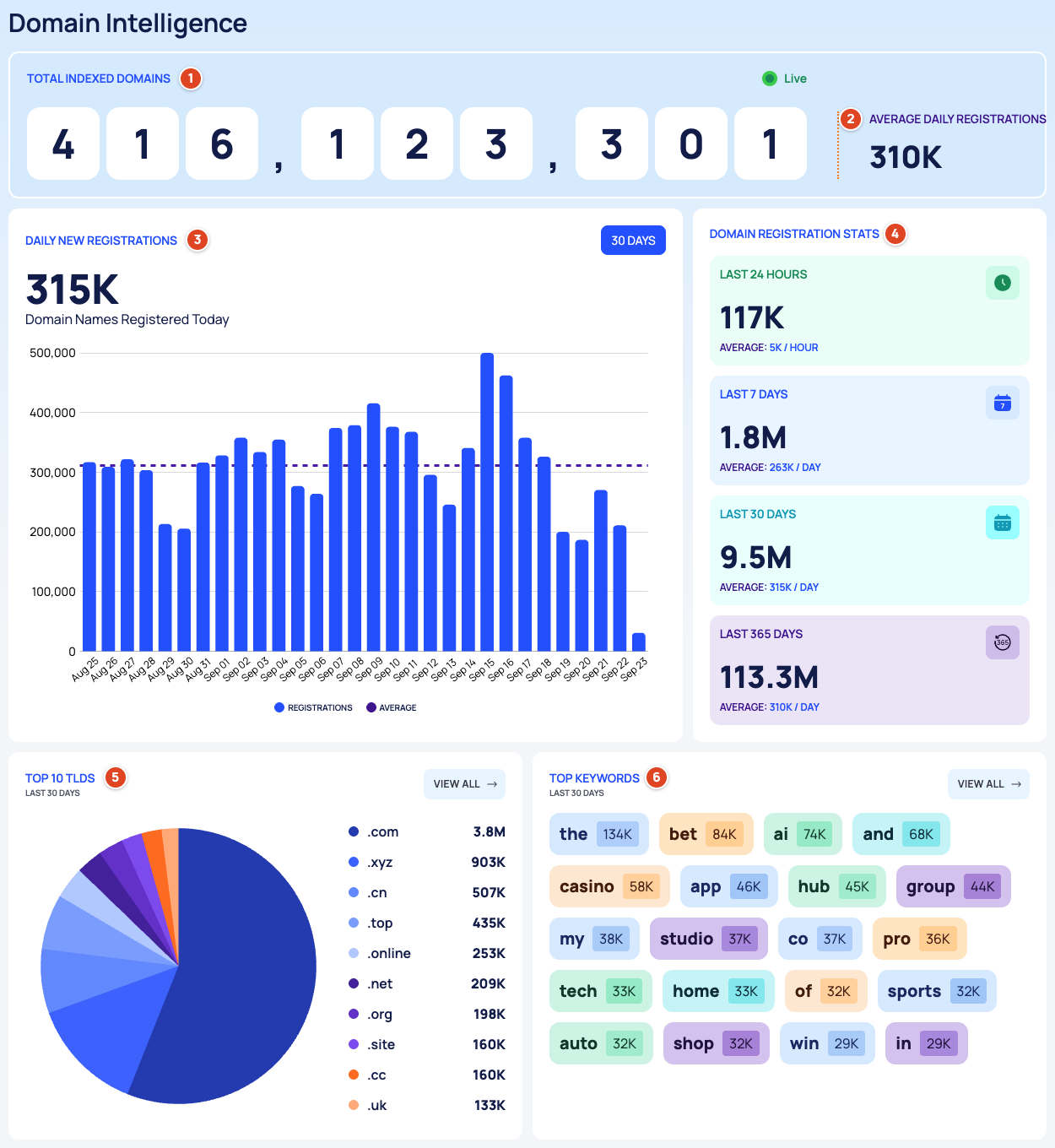
- TOTAL INDEXED DOMAINS (Live): the number of domains Deepinfo has indexed. The counter keeps rising while you watch: your browser adds an estimate based on the daily registration rate. It is not a live count.
- AVERAGE DAILY REGISTRATIONS: how many domains are registered on an average day.
- DAILY NEW REGISTRATIONS (30 DAYS): a chart of the domains registered each day over the last 30 days, with REGISTRATIONS and their AVERAGE. The large number above the chart is the average per day over those 30 days. For the last day's registrations, read LAST 24 HOURS in the next card.
- DOMAIN REGISTRATION STATS: registrations in the LAST 24 HOURS (with an AVERAGE per hour), the LAST 7 DAYS, the LAST 30 DAYS and the LAST 365 DAYS (each with an AVERAGE per day).
- TOP 10 TLDS (LAST 30 DAYS): the extensions with the most new registrations. VIEW ALL opens TLD Analysis.
- TOP KEYWORDS (LAST 30 DAYS): 20 keywords that appear most in new domain names. VIEW ALL opens Keyword Analysis.
TLD Analysis
Sidebar: DEEP SEARCH & INSIGHTS › DOMAIN INTELLIGENCE, then VIEW ALL on TOP 10 TLDS · https://platform.deepinfo.com/app/dsi/domain-intelligence/tld-analysis
The breadcrumb reads DSI / DOMAIN INTELLIGENCE / TLD ANALYSIS, and the DOMAIN INTELLIGENCE button at the top takes you back.
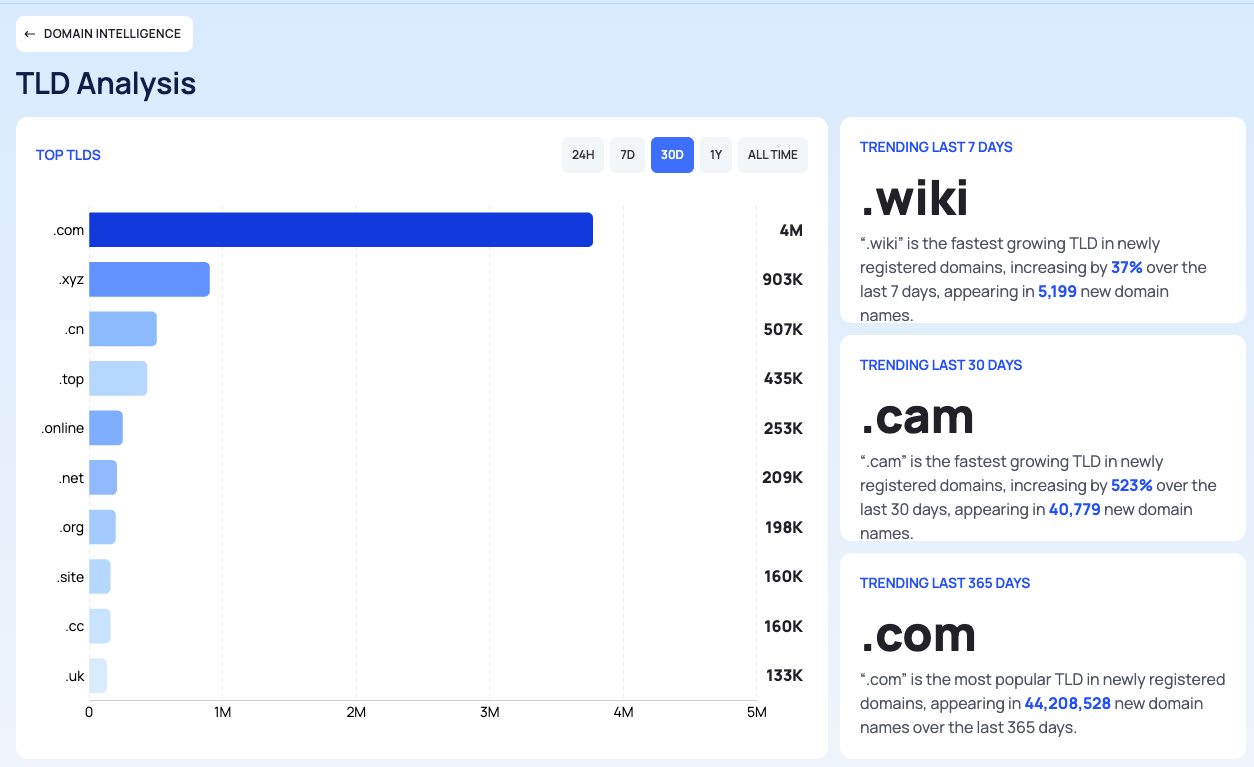
- TOP TLDS: the extensions with the most new registrations. Pick the period with 24H, 7D, 30D, 1Y or ALL TIME.
- TRENDING LAST 7 DAYS, TRENDING LAST 30 DAYS and TRENDING LAST 365 DAYS: each card names one extension: the fastest-growing one, with the percentage it grew by. The 365-day card names the most popular extension instead.
- DOMAIN EXTENSIONS: the extensions with their COUNT of new registrations, 10 per page. Use Search to find an extension, and the period tabs to change the period.
Keyword Analysis
Sidebar: DEEP SEARCH & INSIGHTS › DOMAIN INTELLIGENCE, then VIEW ALL on TOP KEYWORDS · https://platform.deepinfo.com/app/dsi/domain-intelligence/keyword-analysis
The breadcrumb reads DSI / DOMAIN INTELLIGENCE / KEYWORD ANALYSIS, and a back button at the top returns to Domain Intelligence.
- TRENDING KEYWORDS (LAST 30 DAYS): 20 keywords that are gaining ground in new domain names.
- TOP KEYWORDS: the most used keywords, with period tabs.
- KEYWORDS: the keywords with their COUNT, with Search and period tabs.
Good to Know
- The statistics cover all domains Deepinfo sees, not only yours. For your own domains, see External Attack Surface Management (EASM).
- To watch names that imitate your brand, use Brand Risk Protection (BRP) rather than the keyword statistics.
Do This With the API
- Registration counts: Registration Stats
- Daily registrations: Registration Timeline
- TLD ranking: TLD Stats
- Keyword ranking: Keyword Stats