Search the Dark Web
DARK WEB SEARCH searches dark web sources: forums, markets, paste sites, chat channels and leaks. Search by text, narrow the results with filters, and open a result to read its details.
Before You Start
- Package: either Cyber Threat Intelligence (CTI) or Dark Web Search opens the page. Running a search needs Dark Web Search. With neither, the page shows DARK WEB SEARCH IS NOT INCLUDED IN YOUR PACKAGE; see What you can access.
- Role: Admin or Member.
- Results can contain personal data, such as email addresses and card numbers. Read Handle leaked data safely first.
Where to Find It
Sidebar: CYBER THREAT INTELLIGENCE › DARK WEB SEARCH · https://platform.deepinfo.com/app/cti/dark-web-search
Read the Screen
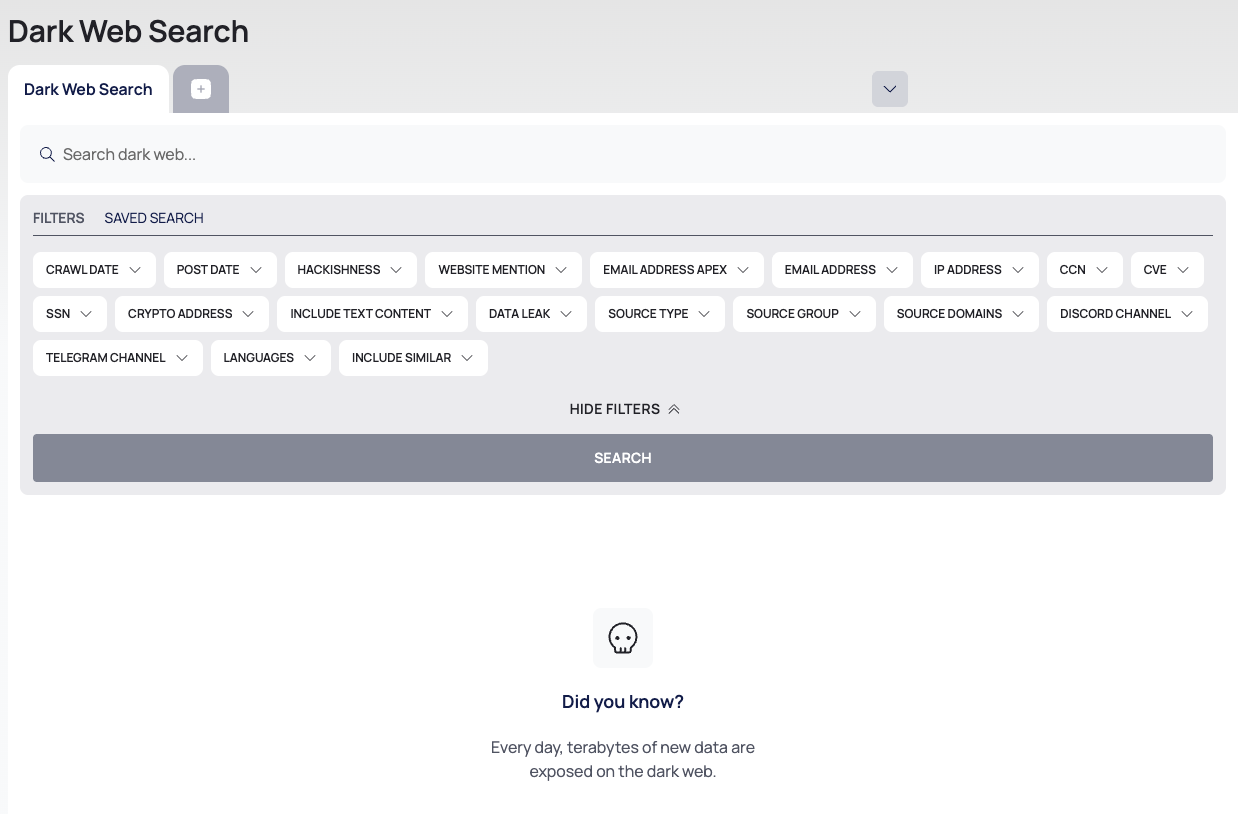
The breadcrumb reads CTI / DARK WEB SEARCH and the page title is Dark Web Search. From top to bottom:
- Search tabs: the first tab is Dark Web Search; + opens a new one. Each tab holds its own search. See Work with search tabs.
- The search box: Search dark web....
- The filter panel, with its FILTERS tab, HIDE FILTERS and SEARCH.
- Before your first search, a Did you know? panel: "Every day, terabytes of new data are exposed on the dark web."
Run a Search
- Type your text in Search dark web... and press Enter. The text becomes a filter chip, MUST · Content · CONTAINS · <text>. Enter does not start the search.
- Add filters from the panel if you need them (see below).
- Select SEARCH.
Your filters are listed under FILTERS APPLIED. CLEAR FILTERS removes them all.
If the page shows An unexpected error has occurred., the search did not run. Try again later, and write to support@deepinfo.com if the error persists.
Filters
| Filter | What it matches |
|---|---|
| CRAWL DATE, POST DATE | A date range: when the page was collected, and when it was posted |
| HACKISHNESS | A score range |
| WEBSITE MENTION | A domain mentioned in the result |
| EMAIL ADDRESS APEX | Email addresses on a domain |
| EMAIL ADDRESS | One email address |
| IP ADDRESS | An IP address |
| CCN | A card number |
| CVE | A CVE ID |
| SSN | A social security number |
| CRYPTO ADDRESS | A cryptocurrency address |
| INCLUDE TEXT CONTENT | Yes or no |
| DATA LEAK | A leak source |
| SOURCE TYPE | The kind of source, such as Discord, Onion, Telegram or IRC |
| SOURCE GROUP | The group of source, such as forums, markets, pastes or blogs |
| SOURCE DOMAINS | Domains the results come from |
| DISCORD CHANNEL, TELEGRAM CHANNEL | A chat channel |
| LANGUAGES | The language of the result |
| INCLUDE SIMILAR | Yes or no |
A search needs at least one criterion, such as text, an email address, a domain, a CVE or a source.
SAVE THIS SEARCH and the SAVED SEARCH tab of the panel are not available.
Read the Results
Select a result to open it. For the fields a result can carry, such as its metadata, leak details, the values found in it and its raw text, see Darkweb Search in the API reference.
Work With Search Tabs
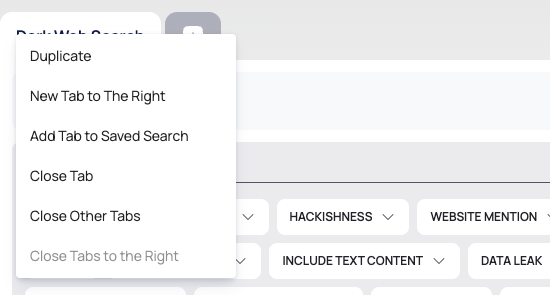
Search tabs work like browser tabs. Right-click a tab for Duplicate, New Tab to The Right, Close Tab, Close Other Tabs and Close Tabs to the Right. Add Tab to Saved Search is not available.
Your tabs, with their searches and results, are kept in this browser for your user, so they are still there after a reload. They are not shared with other browsers or computers. See Handle leaked data safely.
Good to Know
- No export. Results cannot be exported from this page. To take results out, use the API.
- Treat results as sensitive. A result can contain card numbers, social security numbers and email addresses; see Handle leaked data safely.
Do This With the API
- Darkweb Search in the Darkweb reference. The API returns 25 results per page, up to page 250.