Notification Center
A notification rule watches for one kind of event, such as a new issue on your assets, and emails the members you choose, at the frequency you set. You create and manage all rules in the NOTIFICATION CENTER, on the Notification Rules screen.
Note
Looking for Deepinfo's newsletter or product emails? Those are email preferences, set by each user under SETTINGS › USER SETTINGS › Notifications: Company Announcements, Monthly Newsletter, Product Feature Updates and Education Training. They are not security alerts. See Choose which Deepinfo emails you receive.
Before You Start
- Package: your organization's package must include Notifications. Reports and Notifications are included together. If they are not included, the screen is replaced by a notice with a TALK TO US button, which opens an email to support@deepinfo.com. See What you can access.
- Role: Admin or Member. Admins can send a rule's emails to any member of the organization; a member can choose only themselves as the recipient.
Where to Find It
Sidebar: NOTIFICATION CENTER · https://platform.deepinfo.com/app/platform/notification/rules
The breadcrumb reads DEEPINFO / NOTIFICATION CENTER and the page title is Notification Rules.
How a Rule Works
Every rule has:
- One event that triggers it, for example New Issue or Domain Score Decreased.
- Filters (optional) that narrow the event, for example to one asset, to assets with certain tags, or to one severity.
- A frequency: INSTANT, HOURLY, DAILY, WEEKLY or MONTHLY.
- Recipients: at least one member of your organization, who gets the emails.
- A status: ACTIVE or INACTIVE. Only active rules send emails.
Notifications are delivered by email. Slack and Webhook are shown in the rule settings with a Coming Soon label and cannot be switched on.
Events
The table groups the events by what they watch; the full list, with the filters each event offers, is in Events and filters.
| What they watch | Events |
|---|---|
| Assets entering your inventory or discovery | New Asset Added, New Asset Discovered |
| Changes to your assets | Whois Changed, DNS Changed, SSL Changed, New Open Port |
| Issues and vulnerabilities | New Issue, Issue Reappeared, New Vulnerability, Vulnerability Reappeared |
| Security scores | Asset Score Decreased, Asset Score Changed, Domain Score Decreased, Domain Score Changed |
| Lookalike domains (Brand Risk Protection, BRP) | New Suspicious Domain, New Fraudulent Domain |
| Leaked credentials (Cyber Threat Intelligence, CTI) | New Employee Credential Detected, New Client Credential Detected, New Payment Credential Detected |
| Security news (CTI) | New Cybersecurity News |
The names above are the tiles you pick from when you create a rule. The rules list and the rule drawer use longer names for some events, for example New Issue Detected for New Issue.
Read the Screen
When your organization has no rules yet, the screen shows "You don't have any notification rules yet." and a CREATE NEW RULE button.
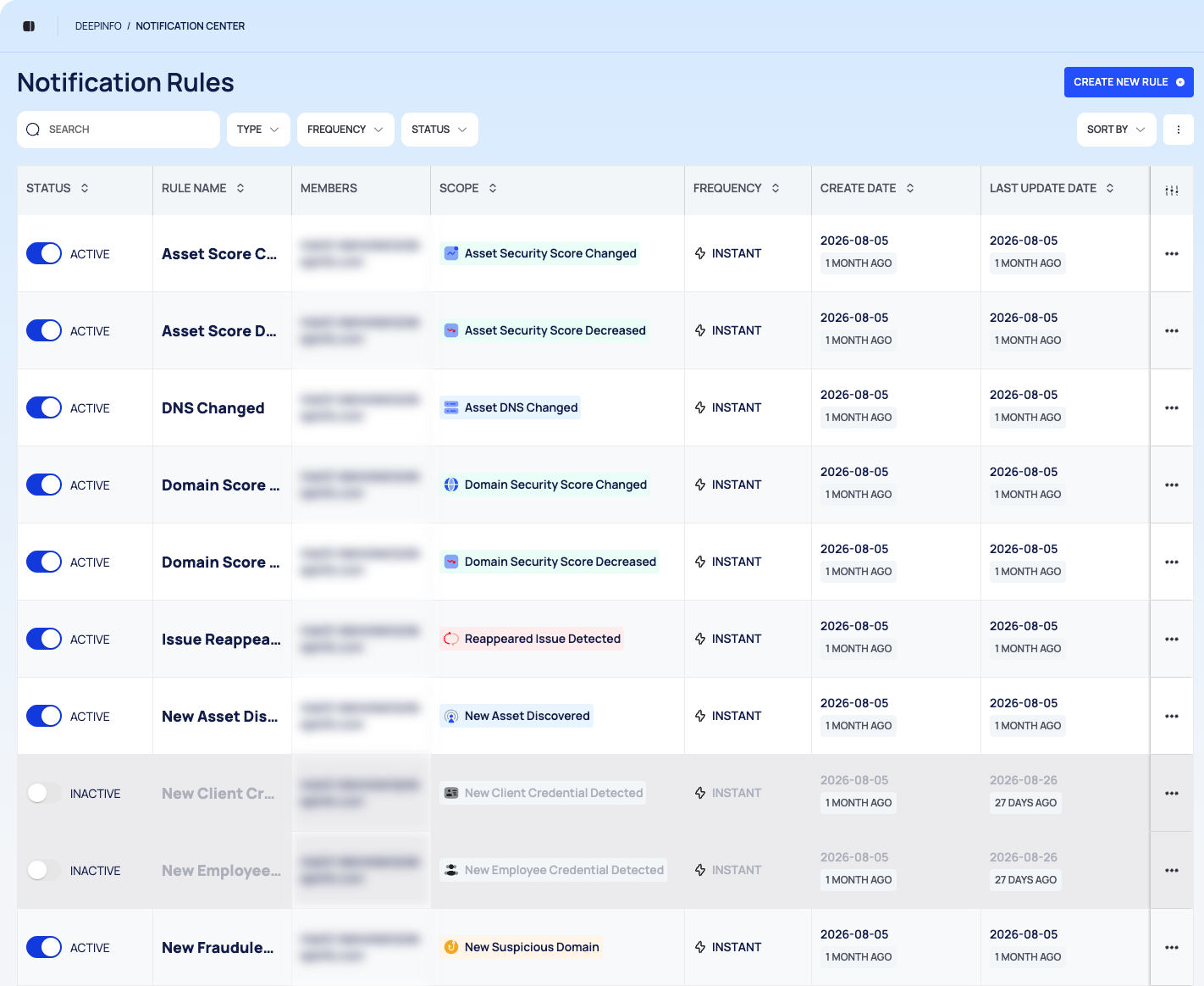
Once rules exist, the screen shows:
- The title Notification Rules and the CREATE NEW RULE button.
- A filter bar: SEARCH, the TYPE, FREQUENCY and STATUS filters, SORT BY and a ⋮ menu for bulk changes.
- The rules table: STATUS, RULE NAME, MEMBERS, SCOPE (the event), FREQUENCY, CREATE DATE, LAST UPDATE DATE and a menu for each row.
Manage notification rules explains each control.
Pages in This Section
- Create a notification rule: the four-step wizard.
- Events and filters: every event and the filters it offers.
- Manage notification rules: find, activate or deactivate, edit, duplicate and remove rules.
Good to Know
- The platform has no list of sent notifications. To see which emails your rules have sent, use the API (below).
- The newspaper icon in the header is not notifications. It opens the Cybersecurity News menu.
- You cannot choose when digests go out. There is no control for the hour or the day of HOURLY, DAILY, WEEKLY and MONTHLY emails.
Do This With the API
Available through the API only:
- List sent notification emails: a log of the emails your rules have sent, with the rule, the time sent and the recipients.