Vulnerability Intelligence
Vulnerability Intelligence summarizes the CVEs (publicly known vulnerabilities) in Deepinfo's database: how many are tracked, how many were published or added to the CISA KEV catalog of exploited vulnerabilities recently, how severe they are by year, which weaknesses (CWE) are most common, and which CVEs are the newest. It is about all CVEs, not only those on your assets.
Before You Start
- Package: Deep Search & Insights (DSI).
- Role: Admin or Member.
Where to Find It
Sidebar: DEEP SEARCH & INSIGHTS › VULNERABILITY INTELLIGENCE · https://platform.deepinfo.com/app/dsi/vulnerability-intelligence
The breadcrumb reads DSI / VULNERABILITY INTELLIGENCE.
Read the Screen
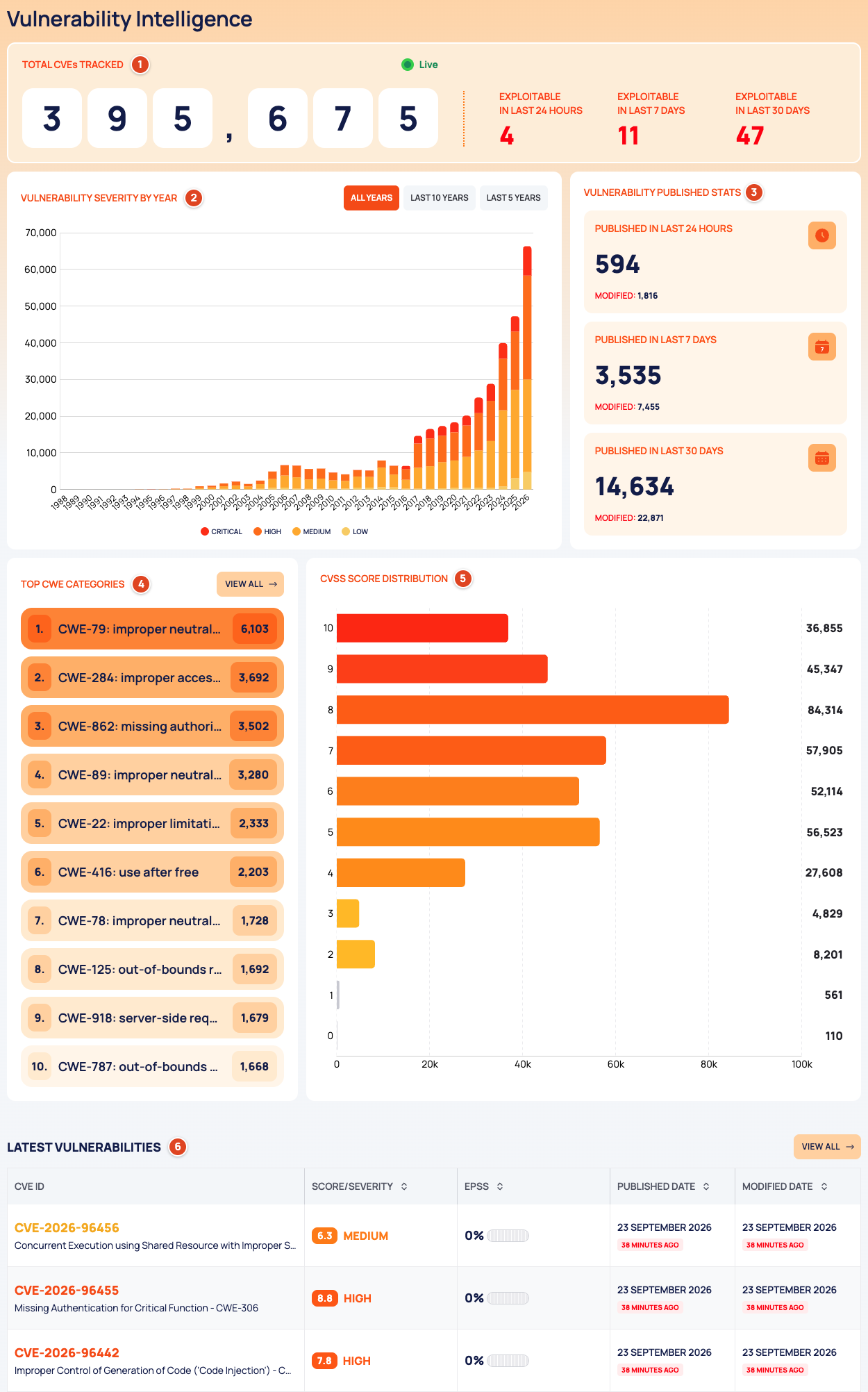
- TOTAL CVEs TRACKED (Live): the number of CVEs in Deepinfo's database. Next to it, tiles count the CVEs recently added to the CISA KEV catalog: EXPLOITABLE IN LAST 24 HOURS, EXPLOITABLE IN LAST 7 DAYS and EXPLOITABLE IN LAST 30 DAYS.
- VULNERABILITY SEVERITY BY YEAR: CVEs per year, split into CRITICAL, HIGH, MEDIUM and LOW. Choose ALL YEARS, LAST 10 YEARS or LAST 5 YEARS.
- VULNERABILITY PUBLISHED STATS: CVEs PUBLISHED IN LAST 24 HOURS, PUBLISHED IN LAST 7 DAYS and PUBLISHED IN LAST 30 DAYS, each with a MODIFIED count.
- TOP CWE CATEGORIES: the most common weaknesses, with VIEW ALL.
- CVSS SCORE DISTRIBUTION: how many CVEs have each CVSS score.
- LATEST VULNERABILITIES: the newest CVEs with CVE ID, SCORE/SEVERITY, EPSS, PUBLISHED DATE and MODIFIED DATE, with VIEW ALL.
Select a row in LATEST VULNERABILITIES to open the CVE in a drawer (see Read a CVE).
CWE Categories
Sidebar: DEEP SEARCH & INSIGHTS › VULNERABILITY INTELLIGENCE, then VIEW ALL on TOP CWE CATEGORIES · https://platform.deepinfo.com/app/dsi/vulnerability-intelligence/cwe-categories
The breadcrumb reads DSI / VULNERABILITY INTELLIGENCE / CWE CATEGORIES, and a back button returns to the main page.
- CWEs BY CATEGORIES: a heatmap of the most common weaknesses per year. Use the range selector to choose the years.
- CWE: a ranked table of weaknesses with their COUNT, one year at a time. Pick the year with the year tabs.
Latest Vulnerabilities
Sidebar: DEEP SEARCH & INSIGHTS › VULNERABILITY INTELLIGENCE, then VIEW ALL on LATEST VULNERABILITIES · https://platform.deepinfo.com/app/dsi/vulnerability-intelligence/latest-vulnerabilities
The breadcrumb reads DSI / VULNERABILITY INTELLIGENCE / LATEST VULNERABILITIES. The table lists the 100 CVEs most recently added to Deepinfo's database, with the same columns as on the main page. Sort by SCORE/SEVERITY, EPSS, PUBLISHED DATE or MODIFIED DATE with the column headers. A CVE without a score shows -, NONE and 0%. Select a row to open the CVE in a drawer.
Read a CVE
Selecting a CVE opens a drawer:
- Header: the score and severity, the CVE ID, the weakness (CWE), the impact on confidentiality, integrity and availability (C/I/A), and the OWASP category.
- Tabs (icons; the open tab's name is its heading):
- OVERVIEW: the description, VENDOR, PRODUCT, EPSS SCORE, CISA KEV, PUBLISHED and LAST MODIFIED.
- CISA KEV CATALOG: the CISA KEV entry, when there is one.
- WEAKNESS IDENTITY: the CWE.
- CVSS METRICS: the CVSS vector, explained metric by metric.
- AFFECTED PRODUCT: the products the CVE affects.
- REFERENCES: reference URLs, each with its source.
This drawer has no OPEN IN NEW TAB. To open a CVE in a page tab of its own, search for it in Vulnerability Search.
The Glossary explains CVSS, EPSS, CISA KEV and the C/I/A letters.
Good to Know
- For the CVEs found on your own assets, see Prioritize vulnerabilities.
Do This With the API
- Totals: CVE Stats
- Severity by year: Severity By Year Stats
- CISA KEV additions: CISA KEV Stats
- Weaknesses over time: CWE Timeline
- CVSS distribution: CVSS Score Stats
- Latest CVEs: Latest Added
- One CVE: Vulnerability Detail