Compromised Employee Data Overview
Compromised Employee Data covers the employee accounts of your organization that were found in leaked credential data, and the credentials found for them. Its OVERVIEW tab is the summary.
Before You Start
- Package: Cyber Threat Intelligence (CTI).
- Role: Admin or Member.
Where to Find It
Sidebar: CYBER THREAT INTELLIGENCE › COMPROMISED EMPLOYEE DATA · Tab: OVERVIEW · https://platform.deepinfo.com/app/cti/compromised-employee-data
The sidebar item opens the COMPROMISED EMPLOYEES tab; select OVERVIEW. The GO TO COMPROMISED EMPLOYEE DATA PAGE button on the CTI dashboard opens this tab in a new browser tab.
Read the Screen
The page title is Compromised Employee Data, with three tabs that belong together:
| Tab | What it shows | Guide page |
|---|---|---|
| OVERVIEW | This summary | this page |
| COMPROMISED EMPLOYEES | One row per employee account | Investigate compromised employees |
| EXPOSED CREDENTIALS | One row per leaked login | Review exposed credentials |
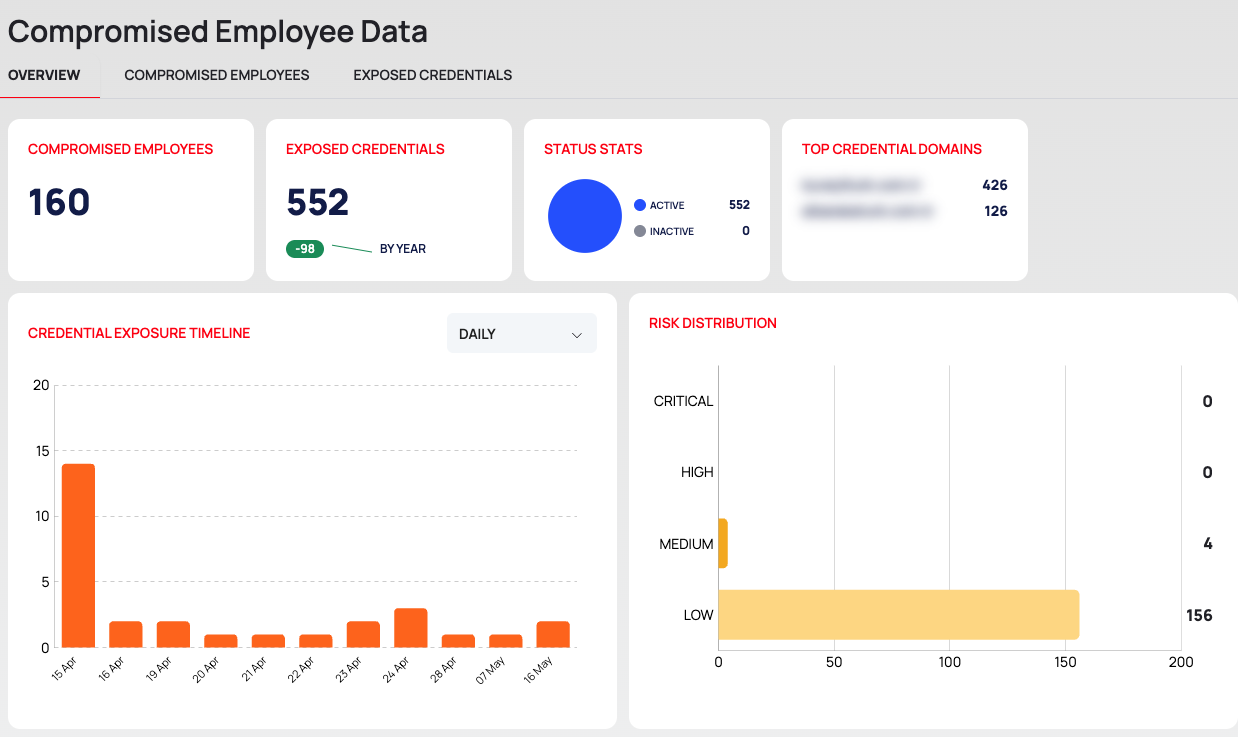
On the OVERVIEW tab, from top to bottom:
- Cards:
- COMPROMISED EMPLOYEES: the number of employee accounts found in leaked data.
- EXPOSED CREDENTIALS: the number of leaked credentials, with a change indicator marked BY YEAR.
- STATUS STATS: a pie of credentials that are ACTIVE and INACTIVE.
- TOP CREDENTIAL DOMAINS: the three domains with the most exposed credentials, with their counts.
- CREDENTIAL EXPOSURE TIMELINE: a column chart of exposed credentials per period. Choose DAILY (the default), WEEKLY or MONTHLY in the card's interval list. It shows up to twelve periods.
- RISK DISTRIBUTION: one bar per risk level, CRITICAL, HIGH, MEDIUM and LOW, with the number of employees at that level.
- RECENTLY EXPOSED CREDENTIALS and RECENTLY EXPOSED EMPLOYEES: the five latest of each, the same lists as on the CTI dashboard. Their headings and arrows open the EXPOSED CREDENTIALS and COMPROMISED EMPLOYEES tabs. A row in RECENTLY EXPOSED EMPLOYEES opens that employee's page.
Risk Levels
Each compromised employee has one of these risk levels, from highest to lowest: CRITICAL, HIGH, MEDIUM and LOW. The platform describes the level as "Composite priority based on credential, role, and recency." The thresholds behind the levels are not shown in the platform.
Good to Know
- Credential states. STATUS STATS counts credentials, not employees. A credential moves to INACTIVE when it is closed, for example when you ignore it or mark it as resolved; see Change the state of exposed credentials.
- No filters or export on this tab. Use the COMPROMISED EMPLOYEES and EXPOSED CREDENTIALS tabs.